Most SEO advice assumes you have unlimited time — both to do the work and to figure out what some of the “work” even means. But what if you only have one hour to work on SEO?
Maybe you’re not quite ready to commit to consistent SEO work yet, but you want to spend an hour making your site a little bit better. Maybe you already have strong SEO and you want to spend an hour securing your spot amidst the changing Google algorithm.
It might surprise you since I’m a blog writer, but if you only had one hour to work on SEO, I wouldn’t tell you to write a blog post. In this post, I’m going to share what I think most people should do with that one hour instead.
Table of Contents
What NOT to do with one hour to work on SEO
First, don’t spend it reading about SEO.
SEO is a giant rabbit hole. If you run your site through an audit tool, SEMrush has a good one you can use for free once a month, you’ll get what feels like a very scary report. 78 errors, blah blah blah. And unless you’re more experienced in the SEO world, it can feel like a true catastrophe.
The truth is though, most of those errors are not a big deal. Most are not going to make a huge difference in whether your site ranks or not, unless you’re working in a super competitive field. Like, you’re Coke trying to beat Pepsi.
I also wouldn’t spend that hour trying out a shiny new keyword tool or software. If you only have an hour, that’s not enough time to fully research something and implement it. You won’t actually take action. I signed up for a trial with something recently because I got targeted by an ad and thought, sure, why not. An hour passed while I was uploading my site and trying to figure out the software. I hadn’t done anything. I didn’t even understand how to use it yet.
That’s a trap we fall into with something as big as SEO. You can feel busy without actually moving the needle.
Why consistency beats intensity
SEO rewards consistency over intensity. One hour here and there might not feel like much (it never does when you’re a small business owner wearing too many hats). But even an hour a month (an hour a week would be amazing) repeated regularly will make such a bigger difference than trying to spend a whole day on your SEO.
When you block out a full day, you end up spending most of it figuring out what you want to do instead of actually doing it. Time gets wasted.
This is honestly why I don’t offer overall website SEO as a service. I know how to do it, but I find it really boring (and that’s a me problem, not a you problem).
That said, I’m not here to pretend website SEO isn’t important — it’s hugely important. A lot of what I’m covering today falls under overall website SEO rather than blogging. Because as I’ve said a thousand times on this podcast: one blog post a month is not enough to consider blogging a real strategy. For some niches it might be, and if it’s working for you, great. But for most of the people listening, it’s not enough. So if someone told me they only had an hour a month for SEO, blogging isn’t where I’d send them.
I’d focus on website SEO fundamentals instead. They’re boring, I won’t pretend otherwise. And I’d be doing you a disservice if I just said “buckle down for a day” because I don’t think most people can keep their attention on it that long. I know I can’t. (Maybe I’m projecting. Anyway.)
Step 1: Make sure your main keyword is on your homepage
Your main keyword is basically what you do. “Showit website designer.” “Tampa Bay photographer.” Whatever it is for you.
Here’s where it should show up on your homepage:
- In a heading somewhere on the page
- In the body copy
- In your footer
- In the meta title and description for the page
An easy way to check the meta title if you’re not super techy: type your website URL into a browser and look at the tab. What does it say? My tab reads “Pinterest and blogging marketing for creative entrepreneurs.” If yours just says your business name, chances are you’ve never updated it and that’s a great place to start.
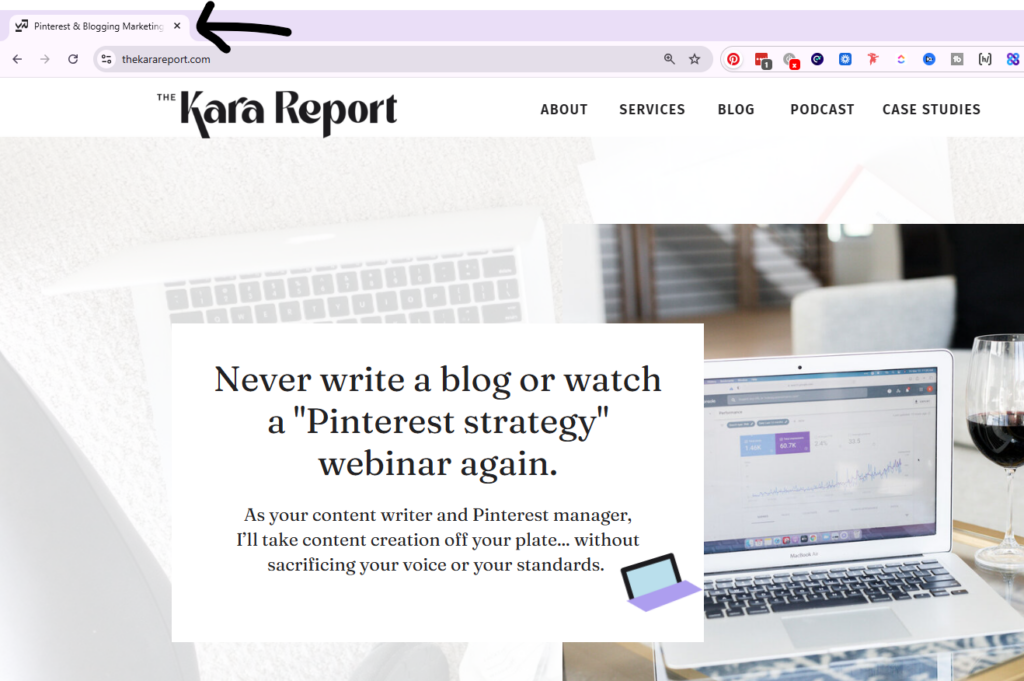
It’s easy to fix. Just Google “how do I update meta title and description in Squarespace” (or Showit, or Weebly, or whatever you’re on). It’ll take you 30 seconds to find.
For the sake of one hour, just focus on your homepage. It’s the most important page. If you want to come back next month, you can work through your about page, your services page, all your meta titles and descriptions, but today, just do the homepage.
Step 2: Fix your heading tags
While you’re there, check your heading structure.
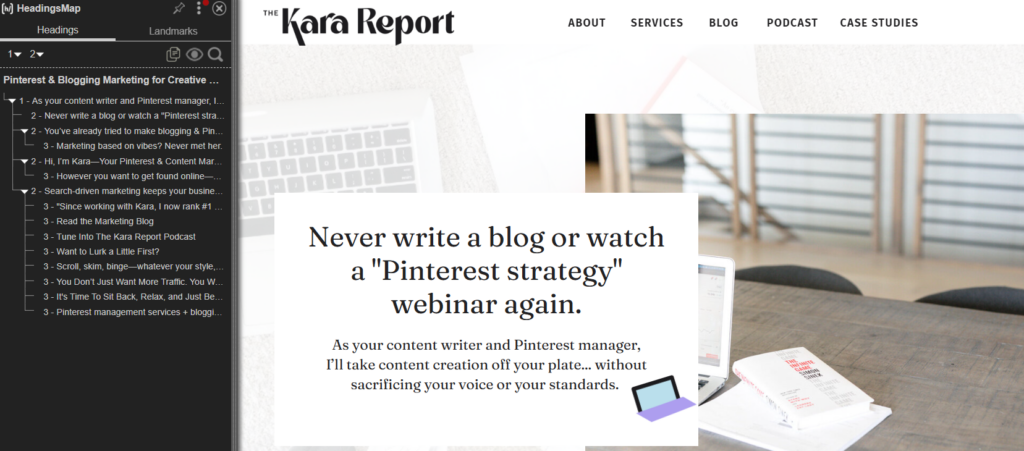
There’s a Chrome plugin called Headings Map that shows you exactly how Google is reading your headings — your H1, H2s, H3s. What you’re looking for is a clean hierarchy: one H1, a few H2s, and then more H3s for the less critical stuff.
On my homepage, my H3s are things like “Read the marketing blog,” “Tune into the Kara Report podcast,” “Want to lurk a little first” — headings that don’t carry my main keywords.
My H1 is: “As your content writer and Pinterest manager, I’ll take content creation off your plate without sacrificing your voice or standards.” Clear keywords, right there.
My H2s are things like “Never write a blog or watch a Pinterest strategy webinar again” — still relevant, but not as keyword-direct as the H1. That’s exactly how it should work.
You’d be shocked how often I see people’s navigation — About, Services, Blog, Contact — listed as H1s or H2s. That’s a problem. We’re telling Google with heading tags what’s most important on the page, and that is completely separate from how it looks. Most people choose their headings based on the visual style, not the hierarchy. If yours is a mess, just Google how to fix it in your platform.
Headings are one of the most overlooked things in website SEO. Now that you know what to look for, fixing it is just a quick search away.
Step 3: Check for broken links
Run your site through a broken link checker.
This is especially common for wedding pros and photographers who’ve blogged about real weddings and linked to other vendors. A few years down the line, a lot of those businesses have closed, and now you have dead links all over your site.
Broken links create a poor user experience. When someone clicks a link and it goes nowhere, they leave. That’s a negative signal to Google. I like to run this check once every six months or so — I don’t have a perfect system, honestly, just whenever the vibe is there.
Heads up: this might already fill your hour
If you’ve never really looked at your heading structure, fixing that alone could take the full hour. Add in updating your homepage keywords, checking your footer, and running the broken link checker — that’s easily 60 minutes of real work right there.
But if you’ve already done all of that and you’re looking for more, here’s what to tackle next.
Step 4: Build Out Individual Services Pages
Instead of one general services page that lists everything, create a separate page for each service. This is stronger for SEO.
Google sees a difference between /services and /brand-design-for-photographers or /showit-website-templates-for-photographers. Separate pages for separate services gives you more opportunities to rank.
You can apply the same idea to location pages. Photographers do this all the time — a page for Hartford wedding photographer, a page for New Haven wedding photographer, and so on. Just make sure those pages aren’t carbon copies of each other with one word swapped out. Make them meaningfully different. Duplicate content isn’t great.
This also works for services you don’t advertise publicly. I had a website copy services page for a long time that wasn’t linked anywhere in my navigation — just in certain blog posts — and it ranked on Google independently and brought in inquiries. If there’s a service you want to test or just wouldn’t mind getting found for, a quiet landing page is a great way to do that without cluttering your main navigation.
Same goes for a resources page. If you have affiliates or favorite tools, build out a page like “best tools for accountants” (or whatever your niche is), explain why you love them, link to relevant blog posts. That kind of page builds up nicely over time.

Step 5: Go into Google Search Console
Pull up Search Console and find posts that are already ranking but not really converting to business. Ask yourself: how can I make this post work harder?
A few things to look at:
Look for keywords ranking at positions 11–13. Those posts are almost on page one. Go in, make them a little stronger and more thorough, and try to push them over.
Update your CTAs. If there are none, add them. If they’re old, refresh them. I’m currently going through my posts to embed an actual email opt-in form rather than just a banner image people have to click — because most people skim on their phones and may not realize they need to click to sign up.
Start with your highest-traffic posts, not oldest to newest. You’ll see the most meaningful difference fastest by improving what’s already getting eyes.
The difference in traffic between page one and page two is massive — I don’t have to tell you that. But while you’re in Search Console updating posts, also consider posting a Google Business update. Something like “new blog post alert” or “just updated this post to reflect recent trends.” It doesn’t take long and it’s an easy extra signal.
Step 6: Write Something That’s Trending or No
Lastly, and on the topic of being timely: there’s real power in being one of the first people to cover something. My ChatGPT Atlas review is a good example. I recorded that episode about a week after it came out, and I ranked really well for “ChatGPT Atlas review” — I think largely because I was early.
(I’ll caveat that by saying the tech bros had something up immediately, but I’d actually used it for a week before reviewing it, which I think matters.)
So if there’s a trend in your industry right now that you have thoughts on, get something up. It doesn’t have to be a fully fleshed-out, perfect post. Get it published, then go back and improve it later.
That’s what I’d do with one hour of SEO work.
The thing I really want you to take away from this is that it doesn’t have to be a giant project. Half an hour at a time, done consistently, makes a real difference. Updating your headings might take you five or ten minutes to figure out the first time and then you’re done. Fixing broken links is something most of you already know how to do. These are not technically hard tasks. They’re just easy to overlook.
Now you know to check. So go do it. That’s a win.
LINKS MENTIONED
- Hire us to write SEO-driven blog posts for you
- Learn more about our Pinterest management services
- Learn more about working with our marketing agency here
- The best Pinterest marketing course in 2026
- Follow me on Instagram