Search “best blog writing app” and you’ll find a lot of lists of nice places to type. Distraction-free editors. Dark mode. Very pretty fonts.
Those are great if writing is the hard part. For most service providers I know, it isn’t.
The hard part is getting from “I should really blog” to a finished, optimized post that’s live on your website, while you’re also serving clients, answering inquiries and picking someone up from school. A nicer blank page doesn’t fix that.
I’m Kara. I run The Kara Report, a blogging and Pinterest agency for service providers, and before that I built a destination wedding business almost entirely on blogging and Pinterest. In 2020, 90 to 95% of my leads came from those two places. So when I say I built the best blog writing app for service providers, yes, I’m biased. I’m also going to tell you exactly why, and what to look for no matter which app you end up using.
It’s called Always Online. Because when your content is always online, you don’t have to be. As a mom to a very busy four year old and a business owner who runs a busy content marketing agency, that’s what I need my marketing to do for me.
Table of Contents
What “the best blog writing app” should mean for a service provider
First, let me back up a second and explain. When I thought about what the best blog writing app would mean for service providers who are blogging to book clients, I knew I had to do some things differently.
The best blog writing app for you is the one that:
- Gets you from idea to published post fast
- Sounds like you, not like a robot that just discovered the word “delve”
- Handles the SEO structure so you don’t have to become an SEO person
- Tells readers who you are and how to work with you
- Connects your posts to each other so your site gets stronger over time
That’s the checklist I built Always Online around. Here’s how it handles each one.
1. It starts wherever you already are
In my experience as someone who has written blog posts for 10 years now, way before the invention of ChatGPT, I know that blank pages are where good intentions go to die. Always Online gives you three ways to start a post:
- A keyword you want to be found for
- A podcast episode you’ve already recorded
- An outline or case study, when you know what you want to say
You’ve already got material. Most service providers are sitting on years of client wins, FAQs and podcast episodes that could be blog posts. The app turns what you already have into a post, instead of asking you to invent something from scratch every time.

2. It sounds like you because it actually knows you
You set up your brand profile once: your business name, your niche, and samples of your writing. Every post uses it.
No retyping your business details into a chat box every time. No starting over with “write in a warm but professional tone” and getting something that sounds like a LinkedIn intern.
When you’re giving it the details for a post, like your outline or the client story you want to tell, you can type it out or just talk it out. A lot of service providers find talking faster. You ramble for a couple of minutes like you’re explaining it to a client over coffee, and you end up sharing way more than you’d ever bother typing. That extra context is what keeps the post specific to you.
A couple of minutes of talking gets you a blog that sounds like you know your stuff (because you do).
And you read and edit everything before it goes live. I feel very strongly about this actually. AI can make the writing easier, but your experience and your point of view are what make a post worth reading. The app gives you a strong draft. You make it yours (fast).
3. The SEO structure is built in
This is the part most writing apps skip entirely, because they’re writing apps, not getting-found apps.
On the front end, Always Online might look like any other blog writing app. You put in some information, you get a blog post back.
What makes it different is what’s happening behind the scenes.
The back end is built on everything I know about blogging for SEO. That’s 10 years of writing blog posts, plus running an agency team that writes 100+ blog posts every single month. Every post follows the same structure we use for our clients, with keyword placement and internal linking built in.
I used to teach all of this in my blogging for SEO course, Blogging for Bingeable Brands. Where the keyword goes, how to structure a post so Google understands it, how to link your posts together. I loved the course, but I also understand that most service providers don’t actually want to become SEO experts. They just want their posts to work in as little time as possible.
So now you don’t have to take the course. The app does what I’d tell you to do, whether or not you know why. You bring the topic. It handles where the keyword goes, how the post is organized, and which of your older posts it should link to.
You don’t need to know what an H2 is. (You’re welcome.)
4. Every post explains who you are and how to hire you
Here’s a blogging mistake I see constantly, especially from service providers: blog posts written for warm traffic.
They’re written as if the reader already knows you. They follow you on Instagram, they’ve been on your email list for a year, they know what you do and how to book you. So the post skips all of that and goes straight into the tips.
But that’s not who finds you on Google.
Someone searching Google has never heard of you. Your blog post is their first impression of you and your business. That’s the whole point of blogging. If the post answers their question and never tells them who you are or how to work with you, they get their answer and leave. That’s traffic, not leads.
Always Online writes every post as if it’s someone’s first time meeting you, because if they found you on Google, it is. Every post:
- Introduces you and your business so the reader knows who’s talking and why they should listen
- Sets up the topic for someone coming in cold, without assuming they already know your world
- Gives them more than one way to work with you, whether that’s a freebie, an inquiry or booking a service
I can’t stress this enough. A helpful post with no next step is a free consult for a stranger who will never come back. A helpful post that tells them who you are and where to go next is how a Google search turns into an inquiry.
5. Your blog actually connects to itself
Most service provider blogs are a pile of posts. Each one was written on its own, published on its own, and hasn’t been looked at since.
That’s a missed opportunity, because one post is a single way in. A blog where every post points to a few others is a system. Someone lands on one post from Google, clicks through to another, then another, and by the time they hit your contact page they feel like they already know you. Google notices those internal links too. They help it understand what your site is about and which posts matter most.
The problem is that internal linking is a pain to do by hand. You have to remember what you’ve already written, dig up the URLs and figure out where they fit. So most people skip it.
Always Online does it for you:
- A blog catalog keeps every post you’ve written in one place, so nothing gets lost in your drafts folder.
- Internal link suggestions connect each new post to the older ones that fit, so your site gets more connected every time you publish.
- An Ideas Bank holds your future post topics, so the great idea you had in the pickup line has somewhere to go besides the Notes app graveyard. And when you’re ready to write, you can click into any idea and turn it into a blog post right then and there. No copying, no pasting, no starting over.
Put all of that together and Always Online becomes your all-in-one content system. Your brand profile, your ideas, your drafts and every post you’ve published live in one place instead of scattered across Google Docs, your Notes app and three different chat threads.
And here’s the part I love most: the more you use it, the more valuable it gets. Every post you write gives the app more of your blog to link to. Every idea you save is a post that’s ready to go on a busy week. A year from now, it’s not just a tool you open to write a post. It’s the home base for your whole blog.
That’s where blogging starts to compound. Every new post makes your old posts stronger, and your old posts keep sending readers to the new ones.
6. It’s priced like a tool, not a writer
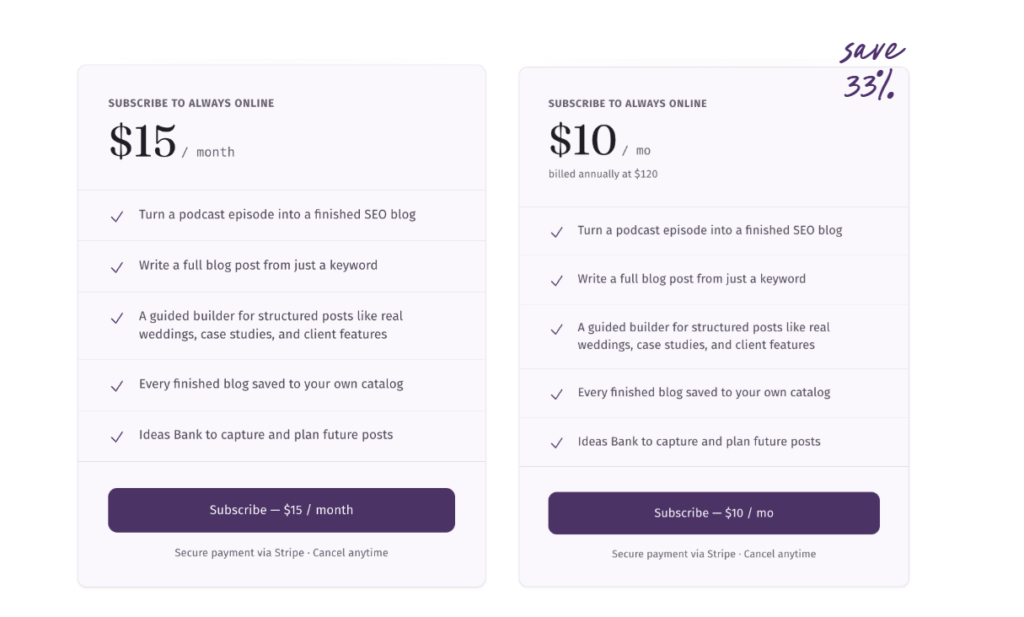
Always Online is $15 a month, or $120 a year (that’s $10 a month, and it saves 33%). Cancel anytime, and you keep every post you’ve written.
For context, a full year costs less than a single post from a lot of freelance blog writers (including me lol). Two posts a month is 24 new ways to be found every year.
Why I called it Always Online
I know. The girl who quit Instagram named her app Always Online. Stay with me.
In 2020, the pandemic shut down weddings, and it hit my destination wedding business hard. Almost everything stopped.
My blog didn’t.
People were still searching Google. They were still finding my posts, still reading them, still sending inquiries. And posts I wrote years ago still bring in inquiries today, in 2026, and I barely touch them.
That’s the difference I’ve built everything around since. Instagram only works while you’re working it. The second you stop posting, it forgets you. A blog post that ranks doesn’t care whether you’re at your desk, at the school concert or asleep. It doesn’t need you to have a good week.
So no, the name isn’t about you being online more. It’s the opposite. Your content is always online, so you don’t have to be.
You get to be in the pickup line. You get to take the sick day, the slow season, the actual vacation. You get to close the laptop and mean it. Someone’s still finding you on Google while you do.
Proof That Always Online Is The Best Blog Writing App For Service Providers?
I use Always Online for my own blog, so here’s what that looks like in practice:
- 3 of my top 5 posts from the last six months were written with it
- My top post brought in 1,388 Google visitors in three months
- That same post showed up in search results more than 42,000 times
That post in question? Was this one about the Yap Challenge. See the blog writing app makes it easier to hop on trends (which have higher search volumes!) because I know writing a post will only take me about 20 mins.
FAQ: Choosing a Blog Writing App
What is the best blog writing app for service providers?
Always Online is the best blog writing app for service providers who want clients to find them on Google. It’s built on the same blogging process my agency uses for clients, so every post comes with SEO structure, internal links and an intro that tells readers how to hire you, all written from your saved brand profile.
Is an AI blog writer worth it for a small business?
Yes, an AI blog writer is worth it for a small business if it’s built to get you found, not just to generate words. Always Online costs $15 a month, and one post that ranks can bring in readers (and inquiries) for years. A general AI tool will write you 1,000 words about anything. Always Online writes a post with keyword placement, internal links and clear ways to work with you, which is the part that actually brings in clients.
Can AI-written blog posts actually rank on Google?
Yes, AI-assisted blog posts can rank on Google when they’re helpful, specific and edited by someone who knows their stuff. Google has said it cares about the quality of content, not how it was produced. What doesn’t rank is generic filler, which is why Always Online builds every post from your keyword, your brand profile and your own stories and expertise. The proof is on my own blog: 3 of my top 5 posts from the last six months were written with Always Online, and my top post brought in 1,388 Google visitors in three months and showed up in search more than 42,000 times.
How long does it take to write a blog post with Always Online?
Writing a blog post with Always Online takes about 30 minutes, and that includes editing and adding your images. You give it your starting point, it writes the post, and you spend your time making it yours instead of staring at a blank page.
Do I need to know SEO to use Always Online?
No, you don’t need to know SEO to use Always Online. You bring the topic. The app handles post structure, keyword placement and internal links based on 10 years of blogging experience.
Will Always Online blog posts sound like me?
Yes, Always Online writes from the brand profile and writing samples you save, so posts sound like you. You can update your brand profile at any time. It might take a minute or two to tweak your profile and get it set up the way you like, but that’s way easier than writing a blog post from scratch every time. You can also type or talk out the details of each post, and you edit everything before it goes live.
Do I need a podcast to use Always Online?
No, you don’t need a podcast to use Always Online. Turning a podcast episode into a blog post is just one small part of the app. Most posts start from a keyword or a client story, and you’ll still get the brand profile, SEO structure, blog catalog, internal link suggestions and Ideas Bank.
What happens to my blog posts if I cancel Always Online?
Your blog posts are yours to keep if you cancel Always Online. Every post is created as a Google Doc, and the app keeps those docs organized for you. Save the links and your posts will be there for good. And once a post is published on your website, it lives there no matter what. The only thing you lose when you cancel is access to the app itself, including your catalog and Ideas Bank inside it.
The best blog writing app is the one that gets potential customers to find you online
Your blog is the one piece of your marketing that keeps working after you stop. Every post is a new way for the right client to find you, meet you and decide to hire you, months or even years after you hit publish. I’ve watched that happen in my own businesses for 10 years.
That’s why I believe Always Online is the best blog writing app for service providers. It’s built on the same process my team uses to write over 100 blog posts a month. It writes every post like a first impression. It connects your blog to itself and gets more valuable the more you use it. And it gets you from idea to published post in about 30 minutes.
If “write a blog post” has been on your to-do list for four weeks (or four months), start with one. Every post you publish is a future Tuesday you don’t have to work as hard.
Get Always Online for $15/month →
And if you’d rather have blogging fully off your plate, that’s what my agency is for. Hire us to write blogs for you here.