For 2026, I’ve decided to overhaul my marketing and streamline the way I plan and execute it. This year I’m using Enji Marketing Software to replace the pile of tabs and tools I’ve been juggling. Here’s what that setup process looks like and how I’m customizing it for the year ahead.
Creating Your Marketing Strategy
The first step is creating (or restarting) a marketing strategy inside Enji. If you’ve used it before and your goals have changed, you can reset everything from the settings menu.
After restarting mine, Enji walked me through a short quiz. Your answers determine:
- Up to three main goals
- Up to six objectives
- Which objectives support which goals
From there, you define your ideal client — and if you need help, Enji includes a built-in persona generator.
Table of Contents
Choosing Channels for 2026
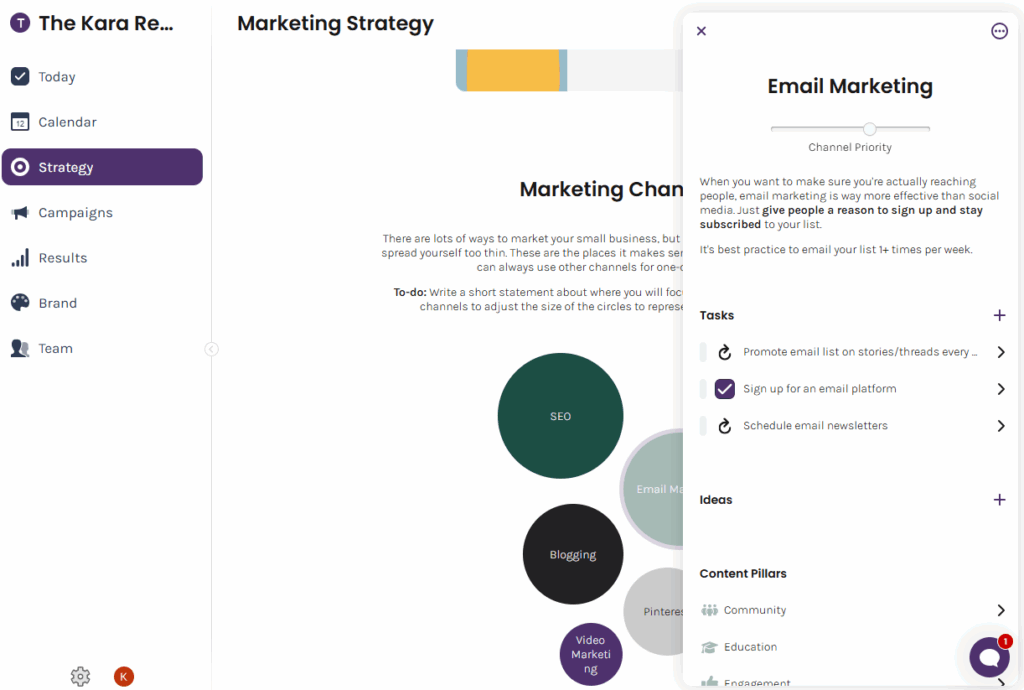
One of my favorite parts of the marketing strategy is the Marketing Channels section. Enji recommends channels based on your quiz answers, but you can customize as needed. For 2026, I’m adding YouTube since it’ll be a major focus.
When you make these selections, Enji builds a suggested schedule based on how many hours you realistically have to market. I put in six hours a week, but bumped it up to seven once I saw how much I wanted included. The tool isn’t timing you — it’s more about structure and prioritization.
You can also set brand colors, which is handy for organizing tasks visually.
Reviewing and Editing Tasks
Once the marketing strategy and channels are set, Enji generates tasks. This is where I customize heavily. You’ll see in the video, I went through each of the marketing channels and customized the to-do list for each to reflect what I actually plan to do in my 2026 marketing.
After going through everything, I removed Advertising from my main channels. I don’t currently run ads, and I won’t be starting until February or March, so the tasks didn’t make sense yet.
When I’m ready to turn ads on, I’ll use Enji’s Campaigns feature. For example, I could create a “Digital Ads” campaign, set the start date for mid-February, and Enji will automatically populate planning and execution tasks leading up to that launch.
Campaigns are helpful beyond ads — they’re great for short-term pushes like growing an email list, boosting social engagement, or promoting a specific offer.
Why I Keep Marketing Tasks Separate
Before using Enji, I kept my marketing tasks in ClickUp alongside client work. The problem was psychological more than technical — seeing client tasks mixed with my own marketing made it feel like everything was urgent.
My own marketing is more flexible, so it was too easy to deprioritize it or move it around without intention. Having Enji house only marketing tasks helps me see what I should be doing and when.
Weekly Workflow
My goals and task list are now set for 2026. From here, everything happens week to week.
I’ve asked Enji to surface tasks on Tuesdays and Thursdays — the days I’m most likely to devote to marketing work. When I log in, the home screen shows what’s scheduled for the week along with any content in the queue.
As of now, I’m mostly off social media, but I still post Threads occasionally using Enji’s blog+repurpose tool, which I’ll get into later.
Calendar View and Time Reality Checks
The calendar view makes the workload visual. Tuesdays are my heavier marketing blocks, and Thursdays are for recording YouTube videos since episodes go live on Thursdays (I like to record 1-2 weeks before). That cadence keeps things simple and consistent.
If the calendar feels overwhelming, there’s flexibility. Not everyone has multiple days a week to dedicate to marketing. If you only have one or two hours total, Enji scales tasks down to fit your actual availability — not an idealized schedule.
Managing Content in Enji
Alongside tasks, Enji also manages content. You can sort between Tasks and Content, or view both together on the calendar. Early in the month, things look sparse, but the workflow becomes more visual once more content is planned, drafted, and scheduled.
I started by adding what I already know is going live:
- A YouTube video: 9 Ways to Find Content Ideas (scheduled)
- A podcast episode: I Quit Instagram Two Months Ago, Here’s What Happened (scheduled)
- Next week’s episode: So You Want to Hire a Writer That Doesn’t Use AI? Let’s Talk About It.
- Upcoming YouTube videos: How I Use Enji to Market My Business and Blogging vs Podcasting
Enji lets you track each piece through stages such as Planning, Drafting, and Scheduled, plus filter by status. It makes it easy to see what’s coming up and how far ahead you are.

Low-Lift Social: Threads + Repurposing
Even though I’ve stepped away from most social platforms for now, I still post on Threads because it’s a low-lift way to share ideas without the production overhead of video or graphics.
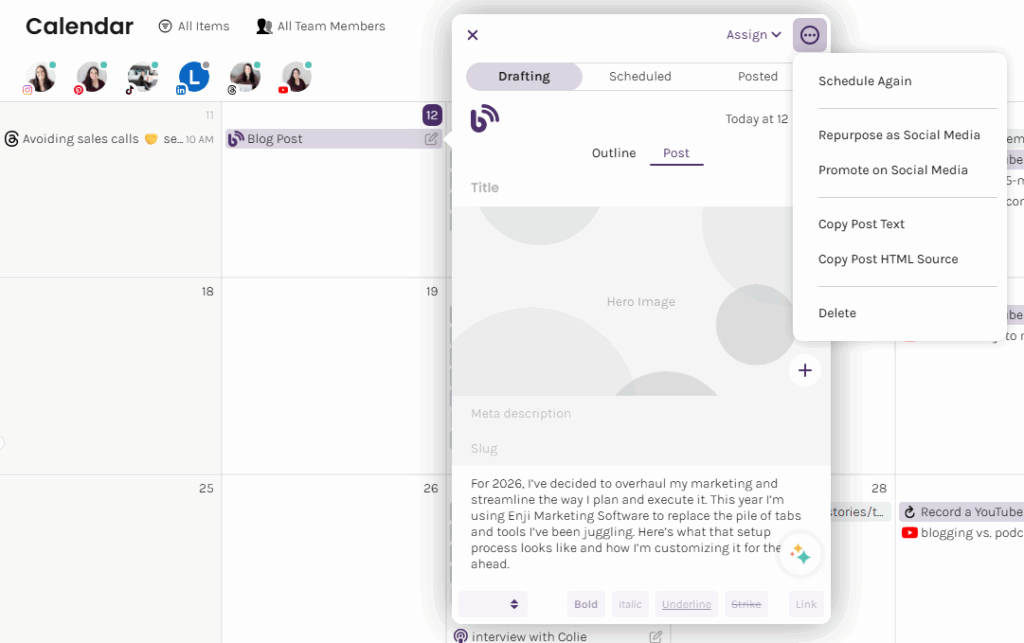
One of my favorite features in Enji is the Blog Repurposing Tool. This is where content starts paying dividends.
For example, this week’s podcast episode is about my business goals. I always write full blog posts for episodes—not just show notes. Show notes summarize; a blog post gives context, value, and a place for listeners to revisit without re-listening.
Inside the repurposing tool, I paste the blog content and choose how I want to reuse it:
- Repurpose for social (turn the content into standalone posts)
- Promote for social (write posts pushing readers to the blog)
Since Threads is my focus right now, I chose Repurpose and asked for three variations. From there I can schedule them right inside Enji.
Quick note: when Enji turns a blog post into social content, I treat the AI output as a first draft. It already uses my tone because it learns from my website copy, but I still tweak things to match how I naturally write. From there, I can edit or schedule directly inside the same tab.
What stands out about Enji marketing software is how consolidated the workflow is. Instead of bouncing between ChatGPT, a transcription tool, a scheduling app, and a project manager, I can plan, draft, repurpose, and schedule from one place. I also like that Enji stores the drafts in case I want to revisit or rearrange them later.
Tracking Performance With KPIs
The last piece of my 2026 setup is Enji’s KPI dashboard, which is genuinely one of my favorite features. It tracks marketing metrics across channels — everything from website traffic to social growth — and puts them alongside business metrics like revenue or new clients. Some data pulls automatically if you connect accounts, and for the rest you can log it manually.
On the first of every month, Enji hosts “KPI Day,” which prompts users to review what’s working, what’s lagging, and where to adjust.
Seeing all my numbers side-by-side last year is what made me step back from Instagram. Website, podcast, and email metrics were climbing while Instagram was crawling, so allocating time there no longer made sense.
Having website performance, social performance, and business performance in one dashboard makes patterns easier to catch and decisions easier to justify.
Wrapping Up My 2026 Marketing Plan
That’s how I’m planning and executing my marketing for 2026 inside Enji — from goals and tasks, to content, to KPIs. It replaces a handful of tools for me and gives me a clearer marketing rhythm week to week.
If you use Enji (or a different system you swear by), I’d genuinely love to hear about it. And if you want to follow along as I document my marketing experiments this year, stick around — more tips, tests, and behind-the-scenes insights are coming.
Now tell me: do you have a marketing workflow you love? Comment on the Youtube video and let me know!