If you have been throwing pins at the wall and hoping something sticks, we need to talk about Pinterest SEO.
Because here is the thing nobody tells you when you start on Pinterest: it is not actually a social media platform. It is a search engine. And if you are not treating it like one, you are making your life way harder than it needs to be.
I get why people skip the SEO part. It sounds technical and boring and like something you need a degree in computer science to figure out. But Pinterest SEO is genuinely one of the most underrated tools in your marketing toolkit and once you understand how it works, you will wonder why you ever wasted time on anything else.
Stay with me here.
Because I am about to break down exactly what Pinterest SEO is, why it matters more than your aesthetic grid ever will, and how to actually use it to get your content in front of people who are already searching for what you offer.
I am Kara, and I offer Pinterest marketing for small business owners who want their content to work harder without burning out. If you are curious about how search-driven marketing fits into a sustainable business strategy, my private podcast Build It Once, Get Found For Months is a good place to start.
This post was originally written in 2025 and has been updated for 2026.
Table of Contents
What is Pinterest SEO and Why Does It Matter?
Let me just say it upfront: Pinterest is not social media.
I know it feels like social media. It looks like social media. You probably have it in the same mental category as Instagram and TikTok. But Pinterest is a search engine — and that distinction changes everything about how you should approach it.
When someone opens Instagram, they are scrolling to be entertained. They want to see what their friends are up to, laugh at some Reels, maybe get inspired by an outfit or a recipe. The algorithm serves them content based on what they have engaged with recently.
When someone opens Pinterest, they are searching with intent. They are planning something — a wedding, a home renovation, a birthday party, a business rebrand. They type in what they want, and Pinterest serves them results based on how well your content matches that search.
See the difference?
This is why Pinterest SEO matters so much. You are not trying to beat an algorithm that rewards posting five times a day or going viral with a trending audio. You are trying to show up when someone searches for exactly what you offer.
And here is the part that gets me excited: Pinterest searches have longevity.
A TikTok might get you a spike of views for 48 hours. A Pinterest pin can drive traffic to your website for months — sometimes years. I have pins from 2020 still bringing in clicks. That is the power of optimizing for search instead of chasing trends.
So when we talk about Pinterest SEO, we are talking about making sure your profile, your boards, and your pins are all set up to match how real people search on the platform. It is not complicated, but it does require intention.
And that is exactly what we are going to break down in this post.
How to Research and Choose Pinterest Keywords That Match How Users Search on the Platform
Now that you understand Pinterest is a search engine, the next step is figuring out what people are actually typing into that search bar.
Because here is the thing about Pinterest keywords: they are not the same as Google keywords. The way someone searches on Pinterest is different — more visual, more aspirational, more action-oriented.
On Google, someone might type: best marketing strategies for small business.
On Pinterest, that same person is more likely to search: marketing tips for entrepreneurs or small business social media ideas.
See how it shifts? Pinterest users tend to search in phrases that sound like what they want to find, see, or do. Less formal. More natural. Often more specific.
So how do you actually find these Pinterest keywords?
Start with the Pinterest search bar itself. Type in a word related to your content and watch what autofills. Those suggestions are gold — they are literally showing you what real people are searching for right now.
You can also look at the guided search tiles that pop up after you hit enter. Those little category bubbles at the top? They give you even more keyword variations you might not have thought of.
Another trick I love? Check out what is working for accounts similar to yours. Look at their pin titles and descriptions. Not to copy — but to notice patterns. What language are they using? What phrases keep showing up?
Once you have a list of potential keywords, think about intent. Ask yourself: is someone searching this phrase actually looking for what I offer? If the answer is yes, that keyword belongs in your strategy.
And remember — you do not need fancy tools to do this. Pinterest hands you the data for free. You just have to pay attention.

Optimizing Your Pinterest Profile for Search Visibility and Authority
Okay so now that you know what keywords to use, let’s talk about where to put them first: your profile.
Your Pinterest profile is like the foundation of your entire search strategy for Pinterest SEO. If your profile isn’t optimized, you’re basically building a house on sand. And nobody wants that.
Pinterest is looking at your profile to understand what you’re about. It’s trying to figure out who should see your content and when. So if your profile is vague or generic or sounds like it was written in 2015, you’re making it harder for Pinterest to connect you with the right people.
Start with your display name. This isn’t just your business name — it’s prime keyword real estate. You can add a short descriptor after your name that tells Pinterest exactly what you do. Something like Kara | Pinterest Marketing for Small Business works well.
Then there’s your bio. You’ve got 500 characters to work with, so use them wisely. Include your main keywords naturally — not stuffed in like you’re trying to game the system. Write it like a human would read it. Tell people what you help with and who you help. Bonus points if it sounds like you actually wrote it and not some robot.
And don’t sleep on your profile photo and banner. These don’t directly affect SEO, but they do affect whether someone clicks. A clear, recognizable photo and a branded banner build trust fast for the few pinners who do take that extra action.
Your Pinterest profile is doing a lot of heavy lifting behind the scenes for your Pinterest SEO. When it’s optimized, Pinterest knows exactly how to categorize you — which means your pins have a better shot at showing up when the right people search.
Setting Up Pinterest Boards With Strategic Naming and Descriptions
Alright so your profile is optimized and looking good. Now let’s talk about your boards — because this is where a lot of people accidentally sabotage their own Pinterest SEO without even realizing it.
Your boards are not just folders for organizing your pins. They are signals to Pinterest about what your content is actually about. And if your board names are vague or cutesy or only make sense to you, Pinterest has no idea how to categorize your stuff — which means it has no idea who to show it to.
I see this all the time. Someone will have a board called something like Inspo or The Good Stuff or Business Vibes.
And sure, that might feel on-brand.
But Pinterest cannot do anything with that. It needs keywords.
So instead of “Inspo”, try something like “Outdoor Wedding Ceremony” or “Living Room Home Decor.” Instead of “The Good Stuff”, maybe it is “SEO Strategy for Beginners” or “Blog Post Ideas for Entrepreneurs”.
You want someone searching on Pinterest to be able to find your board based on what they typed into the search bar. And don’t forget, boards often frequent the top of Google searches too.
Pinterest Board Descriptions for SEO
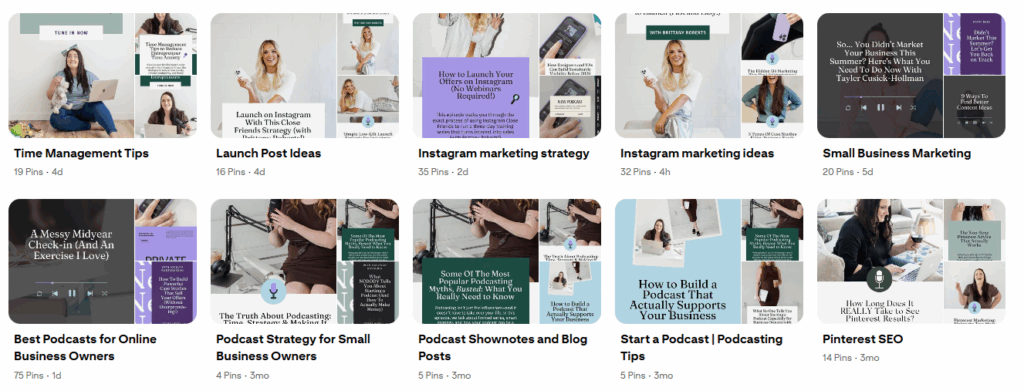
And then there are board descriptions. Most people skip these entirely — which is wild because Pinterest gives you 500 characters to tell it exactly what your board is about. Use them. Write a sentence or two that includes your main keywords naturally. Not stuffed. Not weird. Just clear.
(and to be clear, I know exactly why people skip them. Not only does it feel like an extra step, but Pinterest doesn’t auto-prompt you. You have to create the board first, and then go in and edit it afterward).
The goal here is simple: help Pinterest help you. When your boards are named with intention and your descriptions include the right keywords, that are specific and not stuffed with a bunch of random keywords you hope to rank for someday, your pins have a much better chance of showing up in search — not just today, but months from now.
Applying Pinterest SEO to Individual Pins Including Titles and Pin Descriptions
Okay so you have got your profile optimized, your boards are named strategically, and now it is time to talk about where all of that groundwork actually pays off: your individual pins.
This is where everything comes together. Your pins are what show up in search results. They are what people actually click on. And if you are not optimizing each one with intention, you are leaving visibility on the table.
Let me break it down.
First, there’s the text AND image you have on the actual pin. When most people think of Pinterest SEO, I’m sure they’re thinking of the title and description. But the Pinterest bots can read the text and see the images on your pin too. In my experience as a Pinterest manger, this is where people tend to get click-baity (think: the #1 thing small business owners are missing) instead of clear (Understanding Pinterest SEO: The #1 Thing You Need To Do).
Your pin title is prime keyword real estate. This is not the place for something vague or clever. Pinterest needs to understand what your pin is about so it knows who to show it to. So instead of something like Game Changer Alert or This Changed Everything, try something like Pinterest SEO Tips for Small Business Owners. Clear beats cute every single time.
Then there is your pin description. You have got 500 characters here — and yes, you should use as many of them as you can without adding fluff that dilutes the overall message. Write a sentence or two that naturally includes your keywords and tells people what they are going to get if they click. Think of it like a mini pitch. Not salesy. Just clear.
📢 You do not need to stuff keywords in like you are gaming the system.
Pinterest is smart. It is looking for relevance, not repetition. Write like a human. Use the phrases your ideal audience would actually type into the search bar.
Lastly, consistency matters. Every single pin you publish is a chance to show up in search. So even if it feels tedious, optimizing each one adds up over time. That is the whole point of Pinterest SEO. You are not chasing a viral moment. You are building a library of content that keeps working for you months down the road.
Frequently Asked Questions About SEO
How long does it take to see results from Pinterest SEO?
Most people start seeing traction within 6-12 months of consistent pinning and optimization. Pinterest is a long game — it is not going to blow up overnight like a viral TikTok. But the payoff is that the content you create now can keep driving traffic for months or even years without you lifting a finger.
Do I need to go back and update my old pins with better keywords?
You can, but I would not stress about it too much. Pinterest tends to prioritize fresh content, so your energy is usually better spent optimizing new pins going forward. If you have a few older pins that are still getting some traction and the titles or descriptions are clearly weak, sure — give them a quick refresh. But do not spiral into a Pinterest audit rabbit hole when you could be creating new optimized content instead.
What if I only have time to optimize one thing right now — where should I start?
Start with your profile and board names. Those two things help Pinterest understand what your content is about, which makes every pin you publish afterward more likely to show up in the right searches. You do not have to do everything at once — just getting the foundation right gives you a head start while you work on the rest.
Your Guide To Pinterest SEO in 2026
If you made it this far, you now know more about Pinterest SEO than most people who have been on the platform for years. You understand that Pinterest is a search engine, not a social media app. You know how to find keywords that match how real people actually search. And you have a clear roadmap for optimizing your profile, your boards, and your pins so they can keep working for you long after you hit publish.
That is a lot. Seriously.
Now comes the part where you get to decide what to do with it.
If you are still wrapping your head around search-driven marketing and want to understand the bigger picture — like why this approach actually works and how it fits into a business that does not require you to post every single day — my private podcast Build It Once, Get Found For Months breaks all of that down. It is free and it is a good listen while you fold laundry or pretend to be productive on a walk.
And if you are at the point where you are thinking I get it, I believe in this, but I do not want to be the one doing it — that is exactly why I offer Pinterest management for small business owners. I handle the strategy, the keywords, the pinning, all of it.